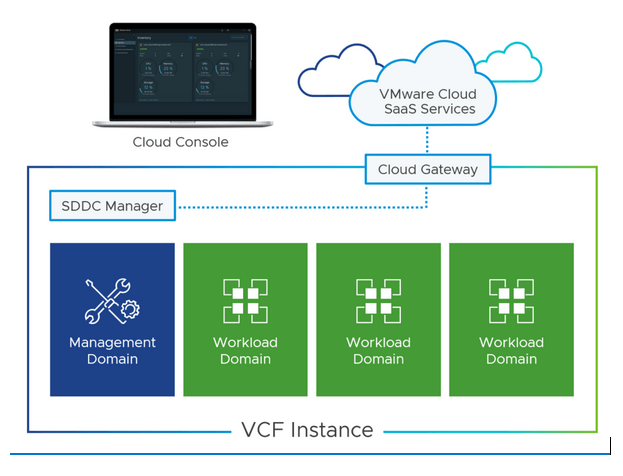
If you’re operating infrastructure on a dark site, internet connectivity isn’t an option. Yet modern software platforms often assume (definitely prefer) always-on access to vendor clouds for updates, licensing, and lifecycle management. This creates a fundamental tension: the platforms best suited to enterprise workloads are often difficult to deploy and maintain in the environments that need them most.
VCF 9 introduces architectural and product feature changes that directly address these constraints. Here’s an overview of the principal challenges and how the platform’s new capabilities address them:
Challenge 1: Software Acquisition and Transfer
VCF comprises multiple interdependent components—vCenter, ESXi, NSX, SDDC Manager, and optionally the Aria Suite—each requiring version alignment defined in the Bill of Materials (BOM). The total binary footprint for a VCF 9 deployment is approximately 133GB including OVAs, ISOs, and patch content.
In isolated environments, acquiring this software means downloading binaries on an internet-connected staging system outside the classification boundary, validating integrity using checksums, then moving content across the air gap via authorised media. The transfer mechanism varies by security architecture—removable storage, data diodes, or cross-domain guards—but the process requires re-validating integrity post-transfer and indexing content for consumption by VCF components.
Previous VCF versions used separate tools and workflows for different component types, increasing procedural complexity and the attack surface during transfer operations.
Challenge 2: Lifecycle Management
Maintaining currency requires regular patching aligned with the organisation’s security posture and any mandated patching cadences. SDDC Manager’s Lifecycle Management engine automates update workflows, but assumes it can discover available updates from Broadcom’s depot, download update bundles, retrieve compatibility matrices from vvs.broadcom.com, and validate prerequisites against online services.
Without connectivity, these functions fail. A known limitation in VCF 9 confirms that SDDC Manager cannot download the compatibility file in air-gapped environments, requiring alternative validation procedures.
Challenge 3: Supporting Infrastructure Dependencies
Beyond VCF itself, operational environments require internal alternatives for services typically sourced externally. Time synchronisation needs GPS-disciplined NTP or an internal stratum hierarchy rather than public pools. Certificate services require an internal PKI with offline CA and local CRL distribution instead of public CAs and OCSP responders. Monitoring shifts from cloud-based Aria SaaS to on-premises Aria Operations. Even access to documentation and knowledge bases needs a local repository.
Each dependency increases the configuration management burden and must be addressed before deployment.
VCF 9 Mitigations
Unified Depot Architecture
VCF 9 consolidates all component binaries and metadata into a single depot structure, replacing the fragmented approach of previous versions. The depot contains two primary directory hierarchies: the PROD directory containing VCF component binaries organised by component type (ESXi, vCenter, NSX, SDDC Manager, VM Tools) along with manifests and metadata, and the umds-patch-store directory containing ESXi patches managed through the integrated Update Manager Download Service.
This consolidation means one structure to transfer, one set of checksums to validate, and one indexing operation to execute. The procedural simplification reduces both transfer time and the opportunity for error during cross-domain operations. Detailed depot structure is documented by William Lam.
VCF Download Tool (VCFDT)
VCF 9 introduces the VCF Download Tool as the primary mechanism for acquiring and managing depot content, available from the Broadcom Support Portal under VMware Cloud Foundation > Drivers & Tools.
For air-gapped operations, the key capabilities are resumable downloads (interrupted transfers resume from point of failure rather than restarting), integrated checksum validation when re-running the tool, selective synchronisation to download specific component types or versions, and an upload operation that indexes locally-transferred binaries without requiring depot connectivity.
Three Depot Configuration Options
VCF 9 supports three depot configurations, accommodating different security architectures.
Online Depot provides direct HTTPS connectivity to Broadcom’s distribution infrastructure, requiring a download token for entitlement validation. Not applicable for air-gapped deployments, but it establishes the baseline architecture that offline options replicate.
Offline Depot (Web Server) is the recommended approach for environments where standing up a web server within the isolated segment is acceptable. An internal HTTP/HTTPS server hosts the mirrored depot structure, and SDDC Manager and the VCF Installer connect using identical protocols to the online depot. The web server needs TLS certificates trusted by VCF components (typically from internal PKI), basic authentication for the PROD directory, and the umds-patch-store directory must remain unauthenticated for SDDC Manager ESXi upgrade operations.
Local Depot (Side-Loading) suits environments where internal web servers face accreditation barriers or aren’t architecturally appropriate—highly compartmented environments with minimal internal network services, temporary or expeditionary deployments, or situations where web server approval timelines exceed deployment requirements. Content transfers to local storage accessible by SDDC Manager, then VCFDT’s upload operation indexes the binaries without requiring network-based depot connectivity. The side-loading process is documented by William Lam.
Planning Considerations
Storage Capacity
A complete VCF 9 depot requires approximately 96-133GB depending on included components. This capacity is needed on the internet-connected staging system outside the classification boundary, on the transfer media (where capacity and transfer mechanism depend on the cross-domain solution in use), and in the target environment’s depot server or local storage. Plan additional headroom for parallel version storage during upgrade windows and future release accumulation.
Transfer Procedures
Establish documented, repeatable procedures for cross-domain transfer that align with the environment’s security operating procedures. Verify checksums on the staging system before initiating transfer, use approved media and transfer mechanisms per the security architecture, then re-verify checksums in the target environment before indexing. Maintain records of transferred content, dates, and validation results for configuration management and potential ITHC evidence.
Compatibility Validation
Given the known limitation with online compatibility checking, establish alternative validation procedures. Maintain local copies of VCF compatibility matrices, validate component versions against documented BOMs before committing to upgrades, and test upgrades in non-production domains before production rollout where environment architecture permits.
Change Management Integration
Air-gapped VCF deployments typically operate under formal change management. Factor in lead time for cross-domain transfer approval, CAB scheduling for update windows, rollback procedures if updates fail validation, and documentation updates for configuration management databases.
Conclusion
VCF 9’s architectural changes—the Unified Depot, VCFDT tooling, and flexible depot configuration options—materially reduce the operational burden of air-gapped deployments. The consolidation into a single transferable structure with integrated validation addresses the procedural complexity that characterised previous versions.
Successful deployment depends on establishing the supporting infrastructure (PKI, NTP, internal DNS), defining transfer procedures aligned with security requirements, and integrating VCF lifecycle management into existing change management frameworks.
For implementation details, consult the VMware Cloud Foundation 9 Documentation.
Spartan is a UK consultancy specialising in VMware Cloud Foundation for defence and government organisations.